Most GPU comparisons for AI inference focus on benchmark scores and VRAM capacity. Power consumption shows up as a footnote. That’s the wrong priority order if you’re running inference continuously, building a home lab, or working within a power budget that has real limits. GPU wattage versus inference performance is a tradeoff that compounds over time, and the math is different depending on whether you’re doing a one-off generation or running a server that handles requests around the clock.
Running AI inference on a power budget isn’t just a home lab concern. It matters for anyone running local models on hardware that shares a circuit with other equipment, anyone paying their own electricity bill, and anyone trying to understand why a high-TDP GPU might actually be the wrong choice for their specific inference workload. The relationship between LLM inference speed and power draw is not linear, and the efficiency sweet spot varies by model size and quantization level.
How to Think About Inference Efficiency
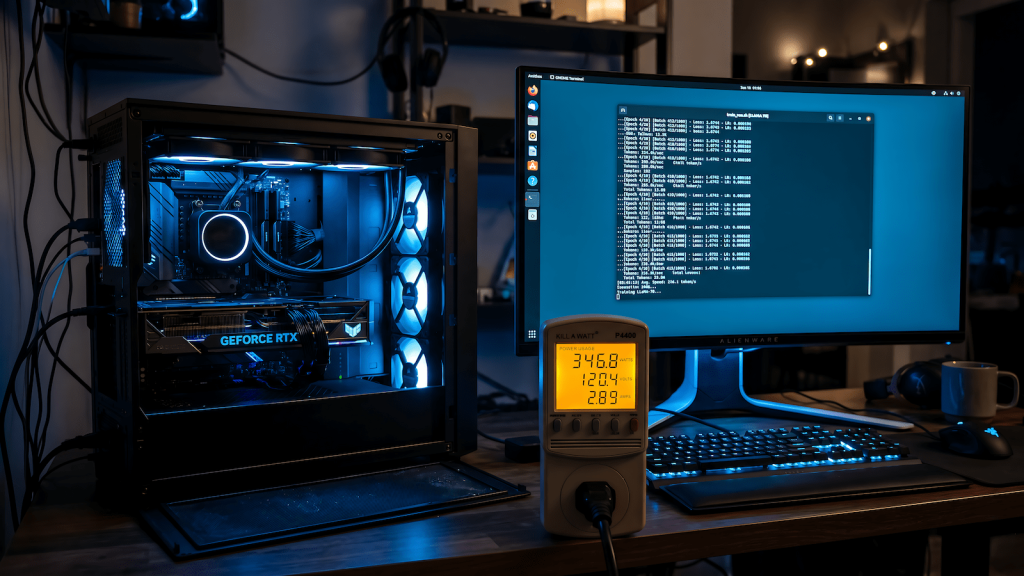
Raw wattage tells you how much power the GPU consumes under load. What you actually want to know is tokens per watt, how much useful inference work you get per unit of power consumed. A GPU that draws 350W but delivers 80 tokens per second is less efficient than a GPU drawing 150W at 50 tokens per second if your workload doesn’t require 80 tokens per second. Efficiency matters when the GPU is under sustained load; peak performance matters when latency is the constraint.
The GPU architecture matters as much as the TDP rating. Consumer GPUs from different generations have significantly different efficiency profiles at the same TDP. A card rated at 200W on a modern architecture with dedicated AI acceleration will outperform an older 200W card on inference tasks while producing equivalent or lower heat output. TDP comparisons across GPU generations without controlling for architecture are misleading.
The Consumer GPU Efficiency Landscape
NVIDIA’s RTX 40-series cards introduced Ada Lovelace architecture with improved tensor core performance per watt compared to Ampere. The RTX 4060 Ti at 165W TDP delivers inference performance competitive with the RTX 3080 at 320W TDP for LLM workloads, making it one of the more efficient choices for a dedicated inference machine on a limited power budget. The tradeoff is VRAM 8GB limits the model sizes you can run at full precision.
AMD’s RX 7000-series cards are competitive on raw rasterization performance but ROCm support for AI inference is still uneven depending on the framework and model you’re using. If you’re running best local AI models through Ollama or llama.cpp, AMD support has improved but you’ll hit friction that NVIDIA users don’t encounter. Factor in that friction cost when evaluating the wattage savings.
Apple Silicon deserves a separate mention because it sits in a different efficiency class entirely. The M-series chips handle inference through unified memory with a power envelope that no discrete GPU matches. An M2 MacBook running a quantized 7B model at 20+ tokens per second at under 30W of total system power is genuinely efficient in a way that desktop GPU builds can’t replicate. If you’re building a low-power inference node, Apple Silicon is worth considering seriously.
Quantization as a Power Lever
Model quantization directly affects power consumption because lower precision arithmetic is faster and generates less heat. Running a model at Q4_K_M instead of full float16 doesn’t just fit the model into less VRAM, it reduces the compute intensity per token, which reduces the sustained power draw under inference load. The relationship between quantization and inference behavior matters here because the efficiency gains from quantization often outweigh the quality tradeoff for practical tasks.
The practical implication is that a lower-TDP GPU running a well-quantized model often beats a high-TDP GPU running at higher precision for the same effective output quality. Before assuming you need more GPU, test whether better quantization on your current hardware achieves acceptable results within your power budget.
Practical Power Budget Planning
A dedicated inference machine drawing 150-200W under sustained load will add meaningful electricity cost over a year of daily use. At 8 hours of daily inference load and average electricity rates, the annual cost difference between a 150W and 350W GPU is real money. If you’re building a home inference server rather than an occasional-use workstation, the total cost of ownership calculation needs to include power consumption.
Power limiting via software is a practical tool that most users ignore. NVIDIA’s nvidia-smi allows you to set a power limit below the card’s TDP. In many cases you can reduce power consumption by 20-30% with less than 10% reduction in inference throughput, because GPUs spend a significant portion of their power budget on peaks that don’t proportionally contribute to sustained performance. Test your specific workload with progressive power limits before accepting the default TDP as fixed.
Running inference efficiently on constrained power isn’t just an optimization exercise. It’s the difference between a home AI server that runs continuously in the background and one that’s too expensive or too hot to leave on. The right GPU for your inference workload is the one that hits your throughput requirement at the lowest sustainable power draw not the one with the highest benchmark score.