The first time you pull a model in Ollama, the name looks like this: phi4:Q4_K_M or mistral:Q5_K_S or llama3.2:Q8_0. Nobody explains what those suffixes mean. The model page says the file size. The README says it is a quantized version. Neither tells you which one to pull or why the choice matters. LLM quantization explained plainly is this: a method of compressing model weights from full floating point precision down to lower bit representations so the model fits in less VRAM without destroying output quality. The number after Q is the bits per weight. The letter after that describes the quantization method. Everything else follows from those two facts.
This post covers what each level means in practice, how much VRAM it saves, what it costs in output quality, and which one to pull for your hardware without overthinking it.
Why Quantization Exists
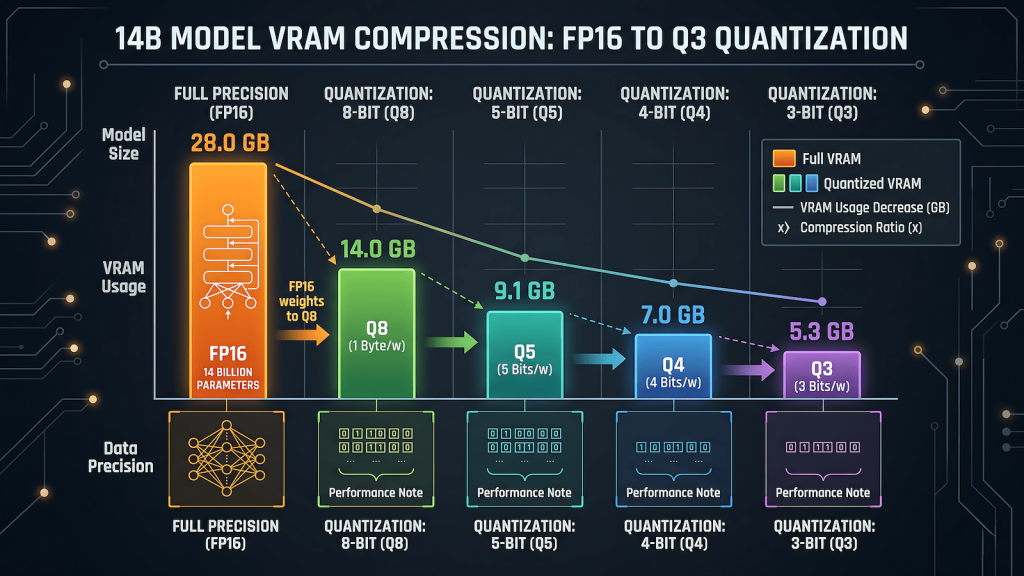
A full precision language model stores every weight as a 16-bit floating point number. A 7B model at FP16 needs approximately 14GB of VRAM to load. A 14B model needs around 28GB. Neither of those numbers is accessible on any consumer GPU that most people actually own. Full precision local inference on consumer hardware is a non-starter for anything beyond the smallest models.
Quantization solves this by reducing the number of bits used to represent each weight. Instead of storing a weight as a 16-bit float, you store it as a 4-bit integer. The model loses some precision in the process. The question is how much precision it loses and whether that loss is meaningful in practice. For most consumer use cases, the answer is that Q4 quantization produces output quality close enough to full precision that the difference is not detectable in everyday tasks. The VRAM savings are not marginal. They are the difference between a model loading at all and refusing to load entirely.
Quantization is what makes the entire local AI ecosystem accessible on consumer hardware. Without it, you would need a professional GPU with 24GB or more of HBM memory to run anything useful. With it, a GTX 1660 with 6GB runs Mistral 7B at Q4 cleanly, and an RTX 3060 12GB runs Phi-4 14B at Q4 at usable inference speeds. Every tier recommendation in the best local AI models for your GPU guide assumes Q4_K_M as the baseline for exactly this reason.
What the Numbers Mean: Q2 Through Q8
The Q number is bits per weight. Lower bits mean smaller file size and lower VRAM requirement. They also mean more compression and more information loss. Here is what each level delivers in practice.
Q2 compresses weights to approximately 2 bits per parameter. The VRAM savings are dramatic: a 14B model fits in around 4GB. The output quality degradation is also dramatic. Coherence suffers, factual accuracy drops, and the model starts producing confident-sounding nonsense more frequently than higher quantizations. Q2 is an experiment tier. It is worth trying if you want to see whether a model fits on extremely limited hardware, but it is not a working tier for serious tasks.
Q3 is marginally better than Q2 but still meaningfully degraded compared to Q4. The quality gap between Q3 and Q4 is larger than the gap between Q4 and Q8. There is rarely a reason to land on Q3 intentionally. If a model fits at Q3 but not Q4, the correct answer is usually a smaller model at Q4 rather than a larger model at Q3.
Q4 is the practical standard for consumer hardware. A 7B model at Q4_K_M needs approximately 4 to 4.5GB of VRAM. A 14B model needs approximately 8 to 9GB. Output quality is strong enough for general use, drafting, coding assistance, summarization, and reasoning tasks. The gap between Q4 and full FP16 precision is real but not operationally significant for most use cases. This is what Ollama pulls by default when you run ollama pull without specifying a tag, and that default is the right call.
Q5 adds roughly 10 to 15 percent more VRAM cost compared to Q4 and delivers a noticeable quality improvement on tasks that require precision: structured output, complex reasoning chains, code generation with specific constraints. A 7B model at Q5_K_M needs approximately 5 to 5.5GB. A 14B model needs approximately 10 to 11GB. If your card has headroom after loading Q4 comfortably, Q5 is the upgrade worth trying. The output difference is real in a way that Q4 to Q8 often is not.
Q6 sits between Q5 and Q8 and is less commonly pulled than either. It exists and works, but most people skip from Q5 to Q8 because the practical difference between Q6 and Q8 is small enough that Q8 is worth the extra VRAM if you can afford it.
Q8 is near-full-precision output at approximately half the VRAM cost of FP16. A 7B model at Q8 needs approximately 7 to 8GB. A 14B model needs approximately 14 to 15GB. The quality ceiling is as high as consumer local inference gets without running full FP16. The catch is that Q8 is only accessible to cards with enough VRAM headroom after the model loads, which means 8GB cards are borderline for 7B at Q8 and 12GB cards are borderline for 14B at Q8. If the model fits cleanly and you have headroom, Q8 is worth running. If it fits but barely, stay at Q5.
What K_M, K_S, and K_L Mean
The K in Q4_K_M stands for K-quant, a quantization method that applies different bit depths to different layers of the model rather than treating all weights identically. Some layers matter more for output quality than others. K-quants allocate more bits to the layers where precision has the most impact and fewer bits to layers where the loss is less noticeable.
The letter after K indicates the size of the quantization groups. M is medium, S is small, L is large. K_M is the default because it strikes the best balance between VRAM efficiency and output quality across the widest range of tasks. K_S uses slightly less VRAM at a small quality cost. K_L uses slightly more VRAM for a small quality gain. For most purposes the difference between K_M, K_S, and K_L at the same Q level is smaller than the difference between Q levels. Start with K_M and only explore K_S or K_L if you have a specific reason.
The _0 suffix you see on some model tags like Q8_0 indicates a simpler non-K quantization method that predates the K-quant variants. It works but K-quants generally outperform the older method at the same bit depth. If both a Q4_K_M and a Q4_0 version of a model are available, pull Q4_K_M.
LLM Quantization Explained Through a Real Example
A concrete example makes this easier to reason about than abstract bit depths. Take Phi-4 at 14B parameters, the model that unlocks the RTX 3060 12GB tier and the one this network runs for drafting and reasoning tasks.
At FP16, Phi-4 14B needs approximately 28GB of VRAM. No consumer GPU outside a used RTX 3090 or A6000 touches that. At Q8, it needs approximately 14GB, which fits on a 16GB card with minimal headroom. At Q5_K_M, it needs approximately 10 to 11GB, which fits on a 12GB card comfortably. At Q4_K_M, it drops to approximately 8 to 9GB, which is where the RTX 3060 12GB runs it cleanly with room for the KV cache. At Q3, it fits on an 8GB card but the output quality drops enough to undermine the reason you chose a 14B model in the first place.
The right pull for an RTX 3060 12GB running Phi-4 is Q4_K_M. It fits with headroom, runs at 8 to 12 tokens per second, and produces output that is not meaningfully worse than Q5 for general tasks. If you have an RTX 4070 12GB with better memory bandwidth, Q5_K_M is worth trying for the quality gain. The VRAM math is what drives the decision, not a preference for a particular suffix. Understanding how inference speed relates to these quantization decisions and why the KV cache consumes additional VRAM on top of the base model load is covered in detail in LLM inference explained.
The One Rule That Covers Most Decisions
Start at Q4_K_M. It is Ollama’s default for a reason. It fits the widest range of consumer hardware, produces output quality that is sufficient for the vast majority of use cases, and gives you a working baseline to compare against if you decide to experiment with higher quantizations later.
If your card has VRAM headroom after loading the model at Q4_K_M, try Q5_K_M. The quality improvement is real on precision tasks and the VRAM cost is manageable if the headroom exists. Do not pull Q5 if it means the model barely fits. A model that fits comfortably at Q4 outperforms a model struggling to load at Q5 every time because inference speed collapses when VRAM is fully saturated.
If Q4_K_M does not fit your VRAM, the answer is a smaller model at Q4_K_M, not the same model at Q3. A well-chosen 7B model at Q4 is more useful than a 14B model at Q2 that generates incoherent output slowly. The VRAM tier guide maps specific model recommendations to specific cards so you are not guessing which size fits your hardware.
Do not touch Q8 unless your card has at least 8GB of headroom above the base model load. Q8 on a card that barely fits the model produces worse results than Q5 on a card with room to breathe, because VRAM saturation affects inference speed and KV cache performance in ways that negate the precision gains.