The honest reason I started looking into running a local LLM on my Android phone is that I didn’t want to walk to my home office. Not because something was wrong with my setup, not because I was traveling, not for any reason that sounds impressive in a blog post. I was in the garden. My phone was in my hand. And I kept telling myself I’d handle the thing I needed to do when I got back to my desk. At some point I realized the desk was the problem, not the task. If I’ve already automated most of my content pipeline, what exactly is keeping me tethered to a chair and a monitor to kick it off?
This isn’t a post about why local AI matters or why you should care about privacy or offline capability. Those are real arguments, covered elsewhere. This is about whether a modern Android phone is actually capable enough to run a local model and do useful work, or whether that’s still a fantasy that requires desktop hardware. I’ve covered what actually runs at every VRAM tier on a GPU, and the best PC build for running local LLMs on the gaming side. The phone question is the next logical one.
What the Phone Needs
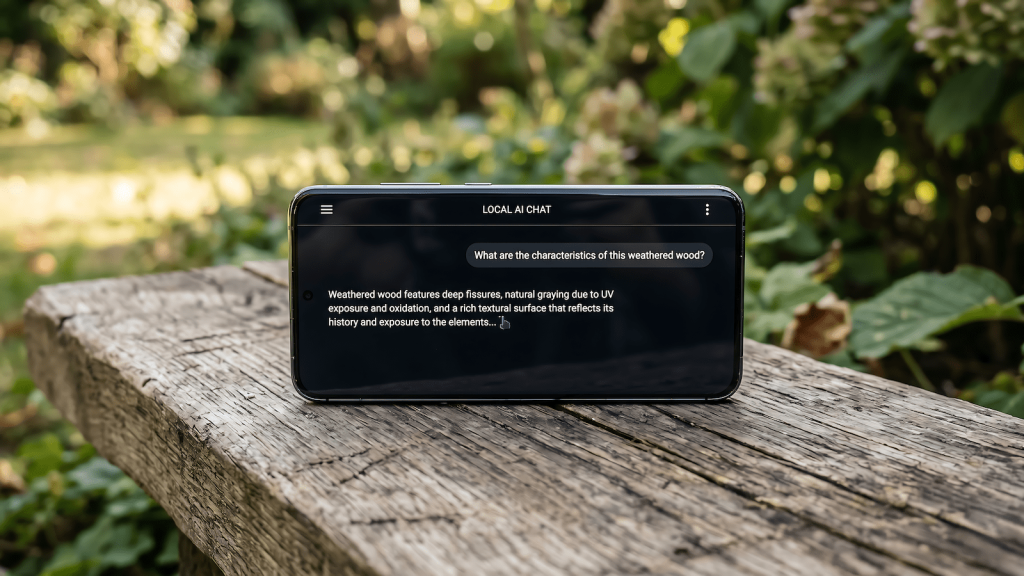
RAM is the number that matters most. Any Android from roughly the last four or five years with 6GB RAM can technically load a model. Technically. At 6GB you’re running 1B to 3B parameter models, and the output quality is proportional to that. It’s coherent, it’s fast, but it’s not going to handle anything that requires sustained reasoning or multi-step logic. It’s autocomplete with better vocabulary.
The practical starting point is 8GB RAM with a Snapdragon 8 Gen 2 or equivalent. That opens up 3B to 7B parameter models, which is the range where the output starts to feel like something you’d actually use. Speed on flagship Snapdragon hardware lands around 15 to 30 tokens per second, which is fast enough that you’re not watching the screen like it owes you money. Phones with 12GB or more RAM can push into 7B models cleanly, running Llama 3.2 7B or Qwen 3 4B without the kind of slowdown that kills the workflow.
The chip architecture matters beyond just RAM. Modern flagship Snapdragons ship with a Neural Processing Unit, and apps that are built to use it get noticeably better throughput at lower battery cost compared to routing everything through the CPU. If you’re buying a phone specifically to run local AI, NPU capability is a real spec to check. If you’re asking whether the phone you already have can do this, the answer for most flagships from the last two years is yes.
The Apps
Off Grid is the most capable general-purpose option on Android right now. It runs Qwen 3, Llama 3.2, Gemma 3, Phi-4, and any GGUF file you want to import from local storage. It detects your hardware automatically and routes inference through the fastest available path, NPU first on supported Snapdragon chips, Adreno GPU via OpenCL as the fallback. One configuration change worth making immediately: go into settings and switch the KV cache to q4_0. It’s the single adjustment that makes the most difference to speed without touching anything else.
Google’s AI Edge Gallery is the easier entry point if you want to test the concept before committing to a full setup. It runs Gemma 4 models on device with minimal configuration, works on both Android and iOS, and goes beyond text chat with offline voice transcription and image analysis built in. It’s not as configurable as Off Grid but it’s a clean first experience. MLC Chat rounds out the useful options, handles quantization selection automatically, and supports a wider model range if you want to experiment.
Which Models to Run at Which RAM
At 8GB, Qwen 3 1.7B and Phi-4 Mini are the reliable choices. They load cleanly, run fast, and produce output that’s useful for drafting and summarization. At 12GB and above, Llama 3.2 7B and Qwen 3 4B are the practical ceiling before the speed-to-capability tradeoff starts working against you in conversation.
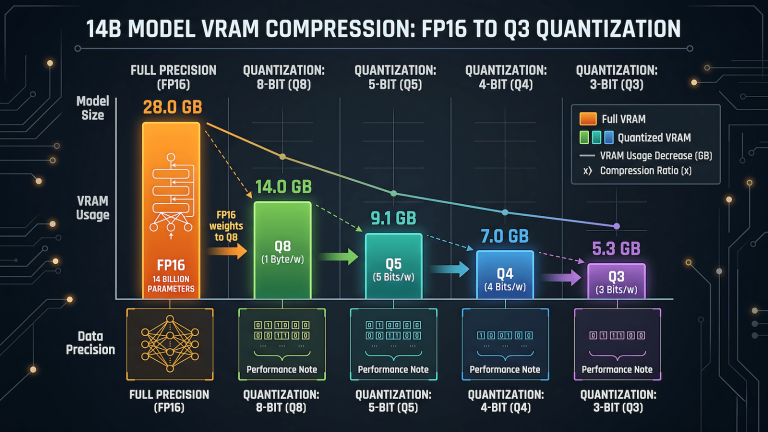
Quantization is what makes all of this work on hardware with memory constraints, if you want the full breakdown of what Q4_K_M, Q5, and Q8 actually mean and how to pick the right level, LLM quantization explained covers it in detail.
A Q4_K_M quantized model uses roughly half the memory of the full precision version with minimal output quality loss in everyday use. The rule for mobile is always Q4 or Q5. Full precision models are for desktops with abundant VRAM. Q4 on a phone gets you the majority of the model’s capability at a footprint that actually fits in your available RAM, and the quality difference for practical tasks is smaller than you’d expect from the numbers.
The Actual Use Case: Running Your Workflow From Your Pocket
Here’s where it gets specific for anyone who’s already automated parts of their setup. My content pipeline runs on n8n with Playwright handling the distribution layer. The automation does the heavy lifting. What I actually need to do at the start of a workflow is closer to a trigger than a task, reviewing a brief, approving a draft, kicking off a sub-workflow, checking output. None of that requires a desktop. It requires a capable interface and enough AI on device to handle the lightweight reasoning that precedes the automated steps.
A local model on your phone handles that gap cleanly. It’s available instantly, it doesn’t eat into cloud tokens, and it works without an internet connection if you’re somewhere with a bad signal. The workflow that used to start with “I’ll do it when I get to my desk” can start in the garden, or on a walk, or anywhere else the desk isn’t. Remote workers who let ideas sit in their heads until they’re back at a laptop understand this friction better than anyone and that is the gap between the idea and the system that captures it is where momentum dies before the context switch even happens. The phone becomes the remote control for infrastructure that already exists, and keeping that incubation loop tight is the difference between a workflow that runs and one that waits.
What It Can’t Do
This section matters. A 7B model on a phone is not a replacement for the cloud models handling your complex reasoning work. The context window is shorter, the output quality on multi-step logic is lower, and anything that benefits from a large sustained conversation will hit the model’s limits faster than a desktop setup with a 13B or larger model running on actual GPU VRAM. The mechanics behind why context length and VRAM interact the way they do are in LLM inference explained. Complex code review, deep analysis, anything where you need the model to hold a lot of context and reason across it and those still belong on the desktop or the cloud.
The phone model earns its place on the tasks where it works: quick drafts, short summaries, yes or no calls, content checks, workflow triggers. It’s not trying to replace the heavy infrastructure. It’s removing the friction between you and the first step.
The Desk Isn’t the Requirement Anymore
The ROG Phone 7 Ultimate runs this well. Snapdragon 8 Gen 2, 16GB RAM, gaming-grade thermal management that keeps performance from throttling under sustained inference load. Qwen 3 4B via Off Grid with Q4_K_M quantization runs at a speed and quality level that’s genuinely useful for daily lightweight tasks. The model stays loaded between sessions because the RAM headroom is there, which removes the reload delay that makes the experience feel broken on lower-spec devices.
But this isn’t about having the best phone. It’s about recognizing that the phone you already carry is probably capable enough to handle the tasks you keep deferring to the desk. The laziness was correct. The desk was always optional for these tasks. It just took a while for the hardware and the software to catch up to that conclusion.