The first time you build persistent browser session automation against a platform that requires login, the setup feels complete: navigate to the login page, fill the credentials, proceed. It works. The problem surfaces on the second run, the tenth run, and especially on any unattended run where no one is present to solve a CAPTCHA or acknowledge a suspicious login prompt. Logging in programmatically on every execution is the wrong architecture for a pipeline meant to run daily without intervention.
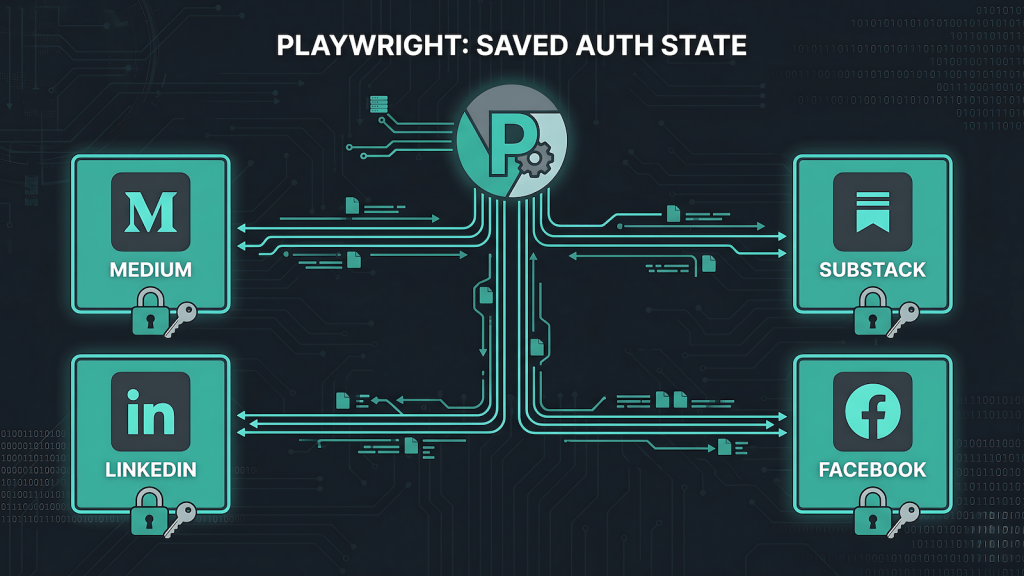
Persistent browser contexts solve this cleanly. The authentication state from a completed login session such as cookies, local storage, session tokens is saved to disk and reloaded on every subsequent run. The browser picks up exactly where the last authenticated session left off. No login flow, no credential prompt, no interaction required until the platform forces a re-authentication.
How Persistent Contexts Work
Playwright’s launchPersistentContext method takes a directory path and writes the browser’s full session state there between runs. Everything that a browser normally keeps in memory such as cookies, session tokens, local storage entries is persisted to disk instead. On the next run, Playwright reads from that directory and the browser opens already authenticated.
The implementation difference from a standard Playwright setup is minimal. Instead of browser.newContext(), you call chromium.launchPersistentContext(authDir, launchOptions). The authDir is a path you define and manage. The launch options are the same arguments used for any other context: user agent string, viewport, any custom headers needed for the target platform. The first run requires a manual login so I navigated to the login page, complete authentication including any MFA prompt, close the browser. The state is written. Every run after that skips the login entirely.
One Directory Per Platform
In a multi-platform setup like EchoCast, session isolation is not optional. Medium’s auth state cannot share a directory with LinkedIn’s. Mixing contexts causes interference, cookies from one domain bleeding into another, storage keys colliding, sessions invalidating unpredictably.
The pattern that works is one auth directory per target platform, stored at a predictable path that echocast-server references by name. For EchoCast the structure is flat: auth/medium, auth/substack, auth/linkedin, auth/facebook. Each Playwright script receives its platform’s auth directory as an argument passed from the Express server at invocation. Nothing is hardcoded inside the script. The server owns the path mapping, the script owns the browser logic.
This separation also makes re-authentication straightforward. When a session expires on one platform, the fix is running the first-login flow for that specific auth directory. The other four are unaffected.
Session Expiry and Pre-Run Checks
Sessions expire. Medium sessions tend to be long-lived like days to weeks depending on account activity. LinkedIn expires more aggressively. When a session expires, the browser redirects to a login page instead of the intended target URL. If the script does not detect this condition, it will attempt to locate post-editor elements on a login page, fail with locator errors, and report a generic failure back to n8n. The root cause is not obvious from the error alone.
The correct mitigation is a pre-run check at the start of every script execution. After loading the persistent context, navigate to a known authenticated URL for that platform and check for an element that only exists when logged in a profile menu item, a compose button, anything stable. If the check fails, exit immediately with a specific error code. n8n receives that code, routes it to a notification node rather than a generic error handler, and the message tells you exactly which platform needs re-authentication and what to do about it.
This check adds two to three seconds to every run. It is worth every millisecond. An automation that fails loudly with a clear diagnosis is recoverable. An automation that fails silently or reports misleading errors is a debugging problem every time.
Why Credential Storage Fails at Scale
The alternative to persistent contexts is storing credentials and running the login flow on every execution. This approach works in controlled environments and fails in production ones. Platforms detect automated login patterns. The signals are consistent: same user agent, no prior browsing history in session, login flow executing faster than a human types, no mouse movement data. The response varies by platform from CAPTCHA challenges, SMS verification prompts, temporary account flags, to silent failures that block posting without any error message.
A persistent context that has been in use for two weeks looks like a real user’s browser. It has accumulated cookies, storage entries, and session history. Medium, LinkedIn, and Substack cannot reliably distinguish it from a person using the platform normally. A fresh credential login on a headless browser cannot make the same claim.
Persistent contexts are also meaningfully faster. Skipping the login flow saves several seconds per run per platform. At one run per day across five platforms, this is noise. At higher frequency or across a larger network, it compounds.
How This Fits Into echocast-server
Within the EchoCast architecture, persistent context management lives in echocast-server an Express server that n8n calls via HTTP Request node. When n8n triggers a syndication run for a specific platform, echocast-server receives the payload, resolves the correct auth directory for that platform, and passes it to the Playwright script as a launch argument. The script uses launchPersistentContext with that directory. n8n never touches the auth directories directly.
This keeps the auth management isolated at the execution layer. If a session expires and needs renewal, the fix happens in echocast-server‘s auth directory structure, not in n8n. The orchestration layer does not need to know about session state.
The full picture of how echocast-server is triggered from n8n and why the Express server architecture was chosen is in Triggering Playwright from n8n. The broader syndication pipeline this mechanism supports is in n8n + Playwright Content Syndication.