Every SaaS pitch sounds reasonable until you look at your monthly statement. Fifteen dollars here. Twenty-nine there. Another tool you signed up for during a productive week and have used exactly twice since. If you run any kind of content operation or blog network, the AI tool tax adds up fast. Most of what you’re paying for is infrastructure you don’t control, wrapped in a UI you didn’t ask for. I got tired of it. So I built my own.
This is not a roundup of tools I found. These are 14 tools I built, deployed, and use. They were developed through a vibe coding process with Alfred, my AI coding agent, and held to a QA standard from the first line of code. Some are BYOK (bring your own key), meaning you connect your own API key and pay only for what you actually use. Two of them need no key at all. None of them need a subscription. All of them are live, open source, and embeddable. The full list is at engineeredai.net/tools/.

What BYOK Actually Means and Why It Changes the Math
BYOK means you supply the API key. The tool sends your request directly to the model provider, Claude, OpenAI, whatever you’re using, and you pay only for that call. No markup. No idle fees when you’re not using it. No monthly charge for a seat you needed once.
For light users, the math is obvious. Why pay $29/month for a tool you use three times? The argument gets more interesting for heavy users, which is where I actually sit. When you’re running a multi-site content network and using AI across writing, SEO, research, and ops daily, the cost is real. The answer is not to stop using AI. It is to stop paying the SaaS markup on top of it. Add local LLMs into the stack for the tasks that don’t need a frontier model, and the cost drops further. BYOK tools running on your own key, plus a local model handling the lighter work, is a more sustainable setup than stacking subscriptions.
The tools in this collection were built with that math in mind. Use what you have. Own what you build. Pay for what you actually run.
What Alfred Built and How It Got Here
Alfred is my AI coding agent, built on a stack of Ollama, n8n, Notion, and a Discord bot, wired together to handle specific tasks across the content operation. One of those tasks is coding. The 14 tools in this collection came out of Alfred’s coding skill: I describe the problem, Alfred generates the code, and I apply a QA layer before anything ships.
That QA layer is not optional. I’ve been a QA engineer long enough to know that vibe-coded output needs scrutiny regardless of how clean it looks. Every tool in this collection went through the same process: define the problem, build the tool, test it against real inputs, break it on purpose, fix what breaks, then deploy. Not every tool passed on the first build. A few needed structural fixes. One got rebuilt from scratch. That is not a failure of the process. That is the process working.
What you’re looking at across these 14 tools is a proof of concept for AI-assisted product development with a QA discipline applied throughout. It is not finished. Tools are still being tested, edge cases are still being found, and a second batch is in progress. That is intentional. This is how beta software should work: shipped when functional, tested in the open, updated when something breaks. The repositories are public on github.com/smallware-co. Fork anything you want.
The Tools
Content and SEO
Content Brief Builder: Keyword in, full brief out. Pulls search intent, suggests structure, and gives you a working brief without the back-and-forth. Built because brief creation was eating time every single week. GitHub
Content Gap Finder: Paste your blog URL and a competitor’s URL. The tool identifies what they’re covering that you’re not. No keyword tool subscription required, no CSV exports to wrangle. It surfaces the gaps and you decide what to do with them. GitHub
Meta Tag Auditor: Paste any URL and get a full audit of your metadata, including title tags, descriptions, Open Graph, Twitter cards, and canonical tags. The output is specific, not a generic score with a vague recommendation attached. GitHub
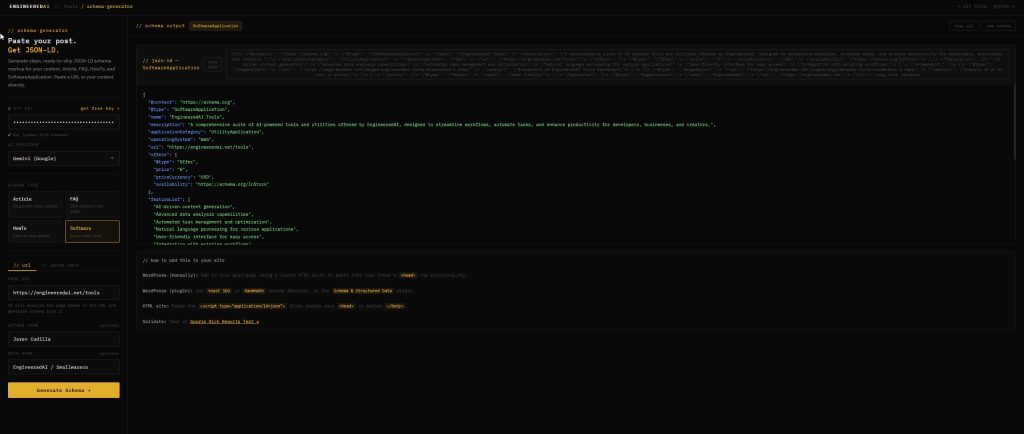
Schema Generator: Generates clean, ready-to-ship JSON-LD schema markup. Paste your content details, get the schema block, paste it into your site. No schema plugin needed, no proprietary format to deal with. GitHub
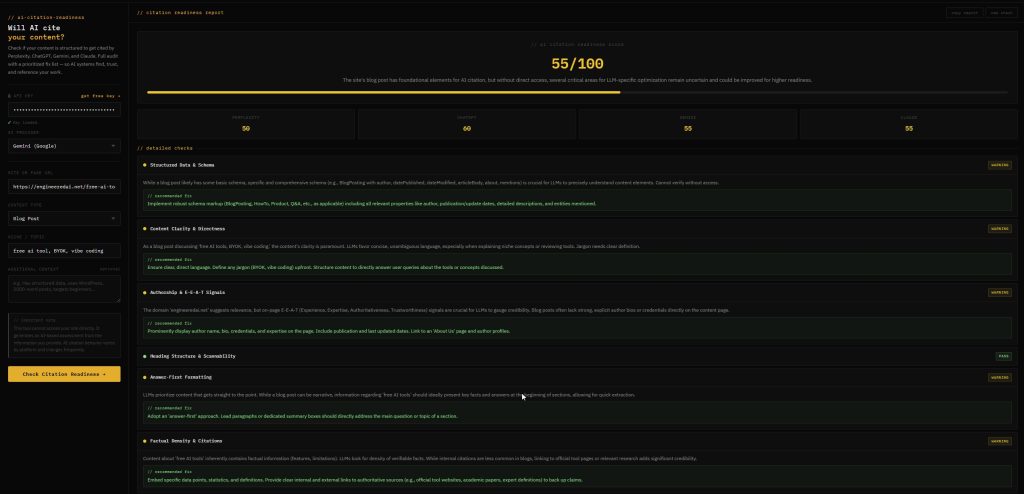
AI Citation Readiness: Checks whether your content is being cited by Perplexity, ChatGPT, Gemini, and Claude. As AI search grows into a real traffic source, knowing whether your content is showing up in those answers matters. This tool checks it. GitHub
Trend Finder: Search trends by location. Built for content planning across a multi-site network where regional relevance changes what topics are worth covering at any given time. GitHub
AdSense and Monetization
These three exist because AdSense is opaque by design, and the official documentation gives you procedures, not answers.
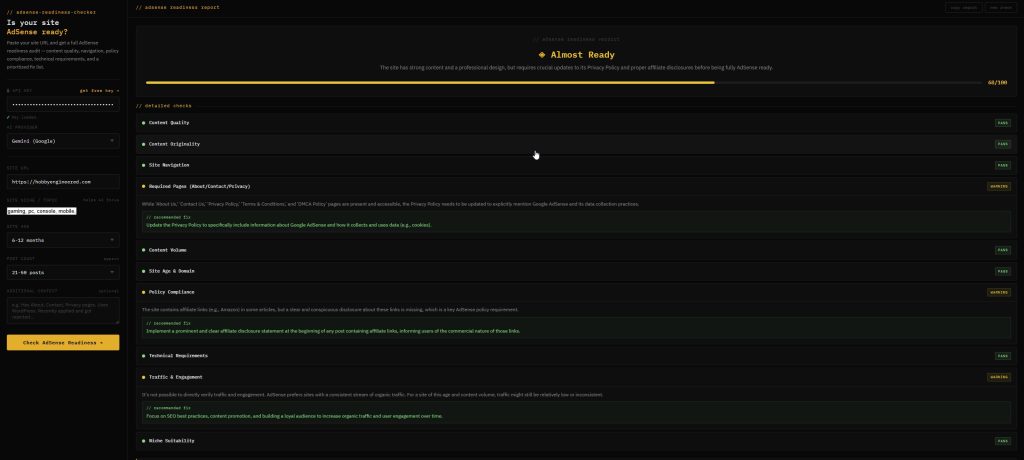
AdSense Readiness Checker: Full AdSense readiness audit before you apply or reapply. Checks your site against the actual criteria that get applications rejected, not the sanitized version in the help docs. GitHub
AdSense Rejection Fixer: Google’s rejection emails are deliberately vague. Paste yours in, and this tool decodes what the rejection actually means and gives you a specific fix list. Built after watching too many people get stuck in the rejection loop with no actionable path out. GitHub
AdSense Revenue Optimizer: Diagnose why your RPM and CPC are underperforming. Input your niche, traffic source, and setup details, and the tool returns specific fixes rather than generic optimization advice. GitHub
Finance and Real-World Use
Budget Breakdown Generator: Paste your expenses, get clarity. It structures your inputs into a readable breakdown and surfaces where the leaks are. Built for the person who knows roughly where their money goes but has never seen it laid out plainly. GitHub
Salary Take-Home Calculator: Gross to net, what you actually earn. Handles deductions and gives you the number your offer letter doesn’t show you upfront. GitHub
No Key Required
Two tools in this collection need no API key at all.
Skill Finder: Searches GitHub for skills and frameworks without authentication. You search, you get results, you move on. No setup, no key, no rate limit drama. GitHub
PowerPlanner: Renewable energy build planner for the Philippine market. Solar, wind, hydro, rainwater. Plan your off-grid or hybrid setup with a tool that accounts for local conditions rather than generic global estimates. Deployed on GitHub Pages, no subscription, no cloud dependency. GitHub
Also in the Pipeline
Reddit Topic Finder: Topic discovery using the Z.AI API. Pulls Reddit signal for content planning without requiring a manual scraping setup. Uses a different key model than the rest of the BYOK tools but follows the same principle: your key, your cost, no platform lock-in. GitHub
How the Build Process Actually Works
Every tool follows the same pattern. Plain HTML, vanilla JavaScript, no framework, no build step. The reason is practical: tools built this way deploy anywhere, break less, and are readable by anyone who wants to fork them. GitHub Pages handles deployment. The repositories are public and MIT licensed.
Alfred generates the initial code. I test it. Not lightly, and not casually. The same way I’d approach any software product: define expected inputs, test edge cases, introduce bad data on purpose, check outputs against what was promised. When something breaks, it goes back into the coding loop. When it passes, it ships. The tools page at engineeredai.net/tools/ reflects what is currently live, not what is in progress. The GitHub org reflects both.
This process is still running. The second batch of tools is in active development, covering areas like debt payoff planning, rent versus buy analysis, contract explanation, and scam detection. They follow the same pattern and will go through the same QA before they appear on the tools page.
The Honest Trade-Off
BYOK tools are not free to run. You pay per API call. For most of these tools, a single use costs fractions of a cent on a current Claude or OpenAI plan. For someone using them occasionally, that cost is essentially zero. For heavy daily use, it depends on your model and your volume, but it is still almost certainly cheaper than the SaaS alternative, especially once you factor in local LLMs for the lighter tasks that don’t need a frontier model at all.
What BYOK does not give you is managed infrastructure. There is no support ticket you can file with Smallware Co. The tools are open source because that is the honest version of free. You can inspect the code, modify it, or fork the whole thing and run your own version. If something breaks, the repository is public and the issue tracker is open.
That is the actual offer: working tools, open code, your key, your cost, no subscription. If that trade-off works for you, the tools are at engineeredai.net/tools/.