You are paying per token every time you ask ChatGPT to rewrite a paragraph, every time you run a draft through Claude to check structure, every time Gemini spits out a bullet list you could have gotten from anything. Some of that spend is justified. Most of it is not.
This guide is about fixing that. You will set up a local-first AI stack on Windows using Ollama and LiteLLM, so the cheap work stays free and the expensive models only show up when they actually need to.
This is not about replacing Claude or GPT. It is about routing.
What You Are Actually Building
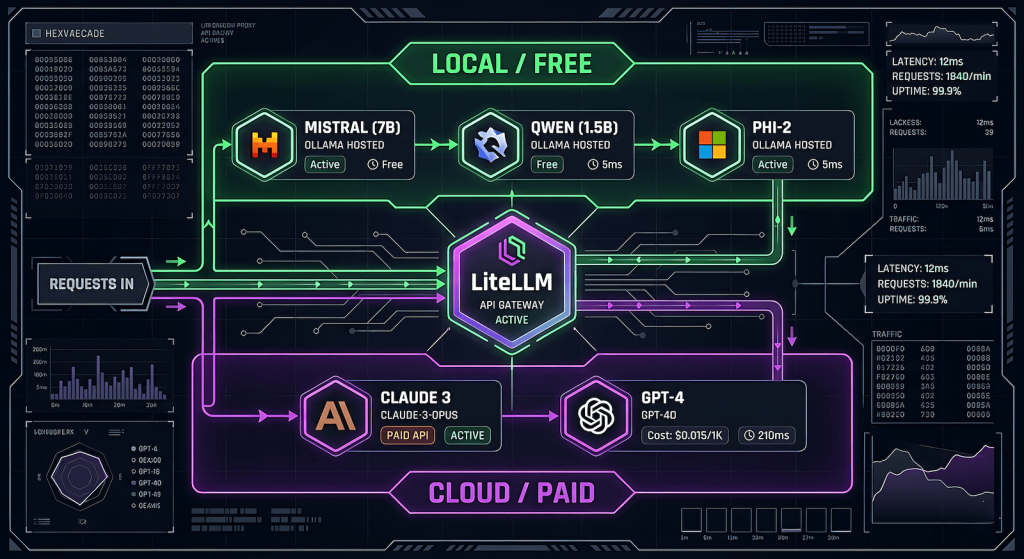
The end state is a proxy layer that sits between you and every AI provider. You call one endpoint. The proxy decides which model handles it based on rules you define. Local Ollama models eat the bulk tasks for free. Cloud models get called only for high-judgment work.
Your tool / script / browser
        ↓
   LiteLLM Proxy  (localhost:4000)
        ↓              ↓
  Ollama (free)    Claude / GPT / Gemini (paid)
Everything routes through one OpenAI-compatible API. Your tooling does not need to change. Your wallet does.
Part 1 — Ollama Setup on Windows
If you already have Ollama running, skip ahead. If not:
Install Ollama
Download the Windows installer from ollama.com. Run it. That is it. Ollama runs as a background service and exposes a local server at http://localhost:11434.
Verify it is running
Open PowerShell and run:
bash
ollama listYou should see your pulled models. Based on your setup, you already have phi, gemma, and mistral available.
Pull a model if needed
bash
ollama pull mistral
ollama pull qwen2.5
Qwen 2.5 is worth adding. It punches above its weight for structured text tasks like summarization, reformatting, and light editing which is exactly where you want to offload work.
Test the local API directly
bash
curl http://localhost:11434/v1/chat/completions \
  -H "Content-Type: application/json" \
  -d '{
    "model": "mistral",
    "messages": [{"role": "user", "content": "Summarize this in one sentence: LiteLLM is a proxy for AI models."}]
  }'
If you get a response, Ollama is serving correctly on its OpenAI-compatible endpoint. This is the same endpoint LiteLLM will talk to.
Part 2 — LiteLLM Proxy Setup
LiteLLM is a Python package that acts as a unified proxy for every major AI provider. You configure it once with a YAML file, start it as a local server, and every tool that speaks OpenAI can route through it.
Install LiteLLM
You need Python 3.9 or higher. In PowerShell:
bash
pip install litellm[proxy]Create your config file
Create a file called litellm_config.yaml somewhere you will remember, for example C:\Users\YourName\litellm\litellm_config.yaml.
yaml
model_list:
  # Local models via Ollama — free, no key needed
  - model_name: local-fast
    litellm_params:
      model: ollama/mistral
      api_base: http://localhost:11434

  - model_name: local-smart
    litellm_params:
      model: ollama/qwen2.5
      api_base: http://localhost:11434

  - model_name: local-small
    litellm_params:
      model: ollama/phi
      api_base: http://localhost:11434

  # Cloud models — only called when you explicitly route to them
  - model_name: claude-editorial
    litellm_params:
      model: claude-sonnet-4-20250514
      api_key: os.environ/ANTHROPIC_API_KEY

  - model_name: gpt-editorial
    litellm_params:
      model: gpt-4o
      api_key: os.environ/OPENAI_API_KEY

general_settings:
  master_key: "your-local-proxy-key-here"  # anything you want, just not empty
A few things to note about this config. The model_name values are what you will pass in API calls as they are aliases, not the actual model strings. Ollama models need no API key. Cloud models pull keys from environment variables so you are not hardcoding secrets into the file.
Set your API keys as environment variables
In PowerShell (or add these to your system environment variables permanently):
bash
$env:ANTHROPIC_API_KEY = "sk-ant-..."
$env:OPENAI_API_KEY = "sk-..."
Start the proxy
bash
litellm --config C:\Users\YourName\litellm\litellm_config.yaml --port 4000You should see output confirming the proxy is running at http://localhost:4000. Leave this terminal open, or set it up as a background service if you want it to start automatically.
Test the proxy
bash
curl http://localhost:4000/v1/chat/completions \
  -H "Content-Type: application/json" \
  -H "Authorization: Bearer your-local-proxy-key-here" \
  -d '{
    "model": "local-fast",
    "messages": [{"role": "user", "content": "Say hello."}]
  }'
If that works, swap local-fast for claude-editorial and verify the cloud routing works too.
Part 3 — The Routing Logic
Now that the proxy is running, the actual value is in being deliberate about which model gets which task. Here is a working framework.
Free tier — Ollama handles this
- First draft generation from an outline
- Reformatting content into a different structure
- Generating metadata drafts (title options, excerpt variations)
- Summarization and compression
- Internal linking suggestions
- FAQ generation from existing content
- Alt text for images
- Repetitive processing tasks — anything you run on more than one piece of content at a time
Paid tier — cloud model earns its tokens
- Final editorial pass on a draft going live
- Anything requiring genuine reasoning about audience or strategy
- Tasks where you need the output to be publication-ready without a second look
- Prompts where nuance in the response actually matters
The rule of thumb is simple. If you would accept the output of a mid-tier model with light editing, route it local. If you are paying for the model’s judgment specifically, route it cloud.
Part 4 — Wiring It Into Your Existing Tools
Open WebUI (optional but useful)
If you want a ChatGPT-like browser interface on top of your whole stack, install Open WebUI:
bash
pip install open-webui
open-webui serve
Point it at your LiteLLM proxy instead of directly at Ollama, and you get model switching across all your configured models — local and cloud — from one UI at http://localhost:8080.
Python scripts
Any script already using the OpenAI Python SDK can route through LiteLLM with one line change:
python
from openai import OpenAI

client = OpenAI(
    base_url="http://localhost:4000",
    api_key="your-local-proxy-key-here"
)

# This hits Ollama/mistral — free
response = client.chat.completions.create(
    model="local-fast",
    messages=[{"role": "user", "content": prompt}]
)

# This hits Claude — costs tokens
response = client.chat.completions.create(
    model="claude-editorial",
    messages=[{"role": "user", "content": prompt}]
)
Same SDK. Same code structure. The model name is the only thing that changes routing.
AutoBlog or content pipeline scripts
If you are running a multi-stage pipeline, assign a model variable per stage at the top of your script:
python
MODELS = {
    "outline_expansion": "local-smart",      # Qwen 2.5 — free
    "draft_generation": "local-fast",         # Mistral — free
    "seo_metadata": "local-smart",            # Free
    "editorial_final": "claude-editorial",    # Paid — only this stage
    "image_alt_text": "local-small",          # Phi — free
}
You define the routing once. Every stage pulls from the dict. Changing which model handles a stage is a one-line edit.
What This Actually Costs You
A rough comparison assuming you are running a 10-article content batch:
| Stage | Without routing | With routing |
|---|---|---|
| Draft generation (10 articles) | ~$1.50 GPT-4o | $0 |
| Metadata generation (10 sets) | ~$0.40 | $0 |
| Editorial final pass (10 articles) | ~$2.00 Claude | ~$2.00 Claude |
| Total | ~$3.90 | ~$2.00 |
The math gets better as batch size increases. The editorial pass stays paid because that is where the quality justifies it. Everything else runs free.
The hardware cost is your own machine doing more work. If you are running Ollama on a machine with a decent GPU (RTX 3060 or better), response times on Mistral and Qwen 2.5 are fast enough to not be a bottleneck.
What LiteLLM Also Gives You
Beyond routing, a few features worth knowing about:
Fallback rules. You can configure LiteLLM to automatically fall back to a cloud model if an Ollama call fails or times out. Useful if your machine goes to sleep mid-pipeline.
Spend tracking. LiteLLM logs every call with token counts and estimated cost. Run litellm --config ... --detailed_debug to see it in the terminal, or connect it to a SQLite database for persistent logging.
Load balancing. If you are running multiple Ollama instances or have access to multiple API keys, LiteLLM can distribute calls across them automatically.
None of these require additional setup beyond what is already in your config file.
The Point
Every token you spend on a task a local model could handle is money you did not need to spend. The tools to fix this are free, the setup takes under an hour, and the workflow does not change — you just swap one endpoint for another.
Run the cheap work local. Save the good models for the work that actually needs them.