My GTX 1660 has been running 24/7 since before the pandemic. It has powered client work, automation pipelines, content production, and more hours of Ollama inference than I can count. When I tried to run Phi-4 on it, it choked. Not because the card is failing, not because of a driver issue, not because of anything fixable in settings. It hit a VRAM wall, and that wall was always going to be there. If you are trying to figure out the best local AI models for your GPU, this guide gives you a straight answer by tier, with honest caveats about architecture that most guides skip entirely.
The local AI space has a hardware context problem. Most guides either assume you are building from scratch with a budget, or they benchmark top-end cards that most people do not own. This guide covers the GPUs people actually have, from 4GB laptop cards to the used RTX 3090 that quietly outperforms newer hardware for this specific workload. Real tiers, real models, real expectations.
Why VRAM Is the Only Number That Actually Matters
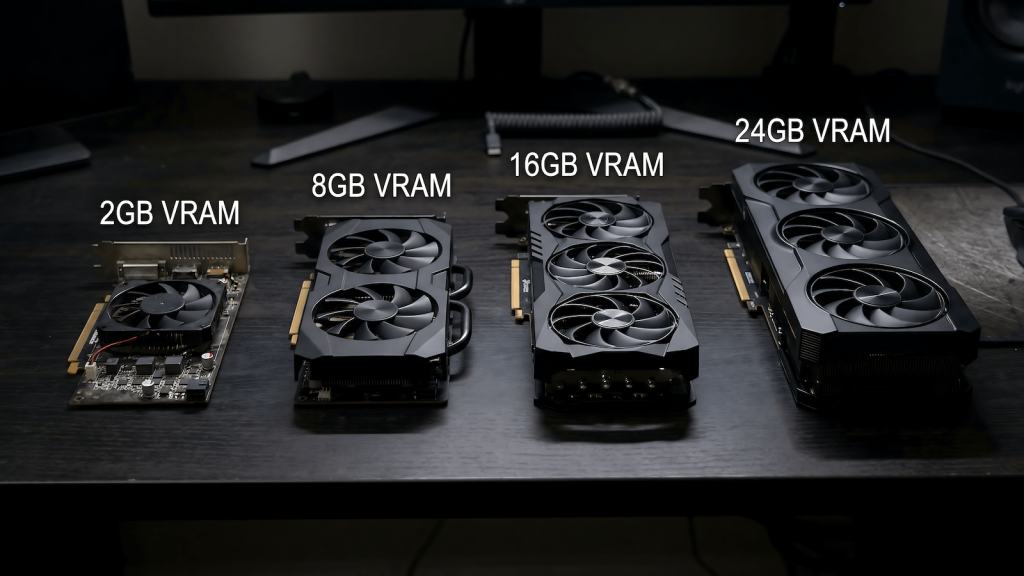
When Ollama loads a model, the weights need to fit in your GPU’s video memory. VRAM is the container. The model is the contents. If the model is larger than the container, one of two things happens: it partially offloads layers to system RAM and runs 5 to 20 times slower, or it refuses to load entirely. Your CPU speed, your NVMe drive, your system RAM — none of these determine what models you can run. VRAM sets the ceiling and everything else is secondary to clearing it.
This is why a GTX 1660 with 6GB runs Mistral 7B cleanly but cannot touch Phi-4 at 14B parameters. The 1660 is not a slow card. It has been a workhorse for years and still is. It is a VRAM-limited card for this specific workload, and those are two completely different problems. Understanding that distinction is the foundation of every decision in this guide.
VRAM capacity determines what fits. Memory bandwidth determines how fast it runs once it fits. Architecture determines how efficiently the card executes the inference workload. All three matter, but in that order.
Architecture Matters Too, and Most Guides Ignore It
Here is the part that VRAM tier guides consistently skip: two cards with the same VRAM do not perform the same for local AI inference if they come from different GPU generations. Architecture is the second variable and it is significant enough to change recommendations.
Pascal cards, the GTX 10-series including the 1070 and 1080, have no tensor cores. Ollama runs on them via CUDA compute only, which works but leaves performance on the table compared to what the VRAM spec alone would suggest. I have a GTX 1070 desktop and my honest assessment without running formal tests is that it will not run local AI models normally even at 8GB. Older architecture, increasingly deprioritized driver support, and no tensor acceleration make it a card I would not recommend for this workload despite the VRAM headroom.
Turing cards, the RTX 20-series, introduced first generation tensor cores. Better than Pascal for inference but still behind the optimization targets of current frameworks. Ampere, the RTX 30-series, is where modern local AI inference starts to behave as expected. The community benchmarks you will find online are mostly Ampere-based. Ada Lovelace, the RTX 40-series, is the current optimization target for llama.cpp and Ollama. The VRAM number tells you what fits. The architecture tells you how fast it runs.
Best Local AI Models for Your GPU by VRAM Tier
All recommendations below assume Q4_K_M quantization, which is Ollama’s default. This compresses model weights to approximately 4-bit precision, reducing VRAM requirements by around 75% compared to full FP16 while maintaining strong output quality. It is the practical standard for consumer hardware and the right starting point for every tier.
| VRAM | What you can run | What you cannot |
|---|---|---|
| Under 6GB | Phi-4-mini 3.8B, Gemma 4 E2B, small models only | Mistral 7B cleanly, anything 7B+ |
| 6–8GB | Mistral 7B, Gemma 4 E4B, Llama 3.2 8B | Phi-4 14B, 13B+ models |
| 10–12GB | Phi-4 14B, Gemma 4 26B MoE, DeepSeek-R1 14B | 30B+ models comfortably |
| 16GB | Mistral Small 24B, Qwen3 14B Q5, DeepSeek-R1 32B Q4 | 70B models |
| 24GB | Qwen3 32B, DeepSeek-R1 32B Q5, most practical models | 70B at Q4 cleanly |
| 32GB+ | 70B models cleanly, no practical ceiling | Nothing consumer-relevant |
Under 6GB: Know Your Ceiling
This tier covers integrated graphics, older GTX 900 and 1000 series cards, and the RTX 3050 laptop GPU at 4GB. I have a laptop with an RTX 3050 that I have never run Ollama on seriously. The combination of 4GB VRAM, laptop thermal throttling under sustained inference load, and the architecture limitations of a mobile GPU make it a machine I would not point at local AI work. Experimentally, small models like Phi-4-mini at 3.8B and Gemma 4 E2B will load. Practically, generation speeds under sustained throttling make it frustrating rather than useful.
If you are in this tier and want to actually use local AI for real work, the honest advice is that a GPU upgrade is the path rather than trying to configure your way past a ceiling that quantization cannot fix. The models that fit in under 6GB are capable for simple tasks but the gap between what they can do and what the 7B tier delivers is meaningful enough that the upgrade argument is real.
6GB: The GTX 1660 and What a Workhorse Can Do
The GTX 1660 is where I live for daily work. Six gigabytes of VRAM on a Turing architecture that Ollama handles well. This card has been running 24/7 since before the pandemic and it still pulls its weight. For local AI, the ceiling is clear: 7B models are the practical maximum and they run well within that constraint.
What runs well:
- Mistral 7B: the workhorse model for a workhorse card, 30 to 40 tokens per second, general use and summarization
- Gemma 4 E4B: fits cleanly, good general reasoning for the parameter count
- DeepSeek-R1 7B: strong reasoning output at this tier
- Llama 3.2 8B: tight on 6GB but manageable
What does not run:
- Phi-4 14B: this is the wall I hit personally, partial offload drops it to unusable speeds
- Gemma 4 26B MoE: technically loads but not comfortably at 6GB
- Anything 13B+: not at this tier, full stop
Mistral 7B on the GTX 1660 is a genuinely capable local AI setup for single-turn queries, light summarization, drafting assistance, and basic code help. It is not a limitation to apologize for. It is simply the ceiling, and knowing where it is prevents the frustration of repeatedly trying to push past it.
8GB: The GTX 1070 Problem and the 4060 Trap
Eight gigabytes sounds like a meaningful step up from 6GB and for newer architecture cards it is. The RTX 3060 8GB, RTX 4060 8GB, and RTX 2060 all live here and run the 7B tier cleanly with a bit more headroom. The GTX 1070 also has 8GB but is a different story entirely.
The 1070 is Pascal architecture with no tensor cores. My honest assessment from knowing the card without running formal tests on it is that it will not run local AI models normally despite the VRAM. Older architecture, decreasing driver optimization from Nvidia, and pure CUDA compute without tensor acceleration mean the 8GB number is misleading for this workload. If you are on a 1070 or 1080, treat yourself as effectively in the 6GB tier for practical purposes and plan accordingly.
The more significant trap at 8GB is the RTX 4060. It is a newer card with better architecture than the 1070, but 8GB of VRAM in 2026 is already a constrained budget for local AI. The RTX 3060 12GB on the used market has more VRAM at a lower price and outperforms the 4060 for this workload specifically despite being a generation behind in gaming benchmarks. Gaming communities will tell you the 3060 is not worth buying in 2026. For local AI, that take is wrong.
What runs at 8GB on modern architecture:
- Mistral 7B: cleanly, with more headroom than 6GB
- Gemma 4 E4B: comfortable
- Llama 3.2 8B: fits properly at 8GB
- DeepSeek-R1 7B: good reasoning at this tier
What still does not run:
- Phi-4 14B: needs 10GB minimum to avoid painful offloading
- 13B+ models: not at this tier on a single card
10–12GB: The RTX 3060 12GB Sweet Spot
This is the tier that changes the conversation entirely. The jump from 8GB to 12GB unlocks the 13B to 14B parameter range, and that jump in model capability is not incremental. Phi-4 at 14B regularly outperforms models two to three times its size on reasoning and structured tasks. Gemma 4 26B MoE runs comfortably at this tier because its Mixture of Experts architecture keeps active VRAM usage manageable despite the 26B parameter count. This is where local AI stops being a curiosity and becomes a daily tool.
The RTX 3060 12GB is the most practical entry point into this tier. Gaming forums dismiss it as too weak for 1440p and outclassed by newer 8GB cards on synthetic benchmarks. For local AI inference, those criticisms are irrelevant. More VRAM beats newer architecture for this workload. The used market puts it at $200 to $230, which makes it the most cost-effective local AI upgrade available right now.
What runs well:
- Phi-4 14B: this is the model the tier unlocks, runs at 5 to 8 tokens per second
- Gemma 4 26B MoE: comfortable at 12GB
- Gemma 3 12B: fits perfectly, strong general purpose output
- DeepSeek-R1 14B: the reasoning specialist at this parameter count
- Qwen2.5-Coder 14B: best coding model that fits this tier cleanly
What does not run cleanly:
- 30B+ models: partial offload, usable but not comfortable
- Phi-4 at Q8: too large for the headroom
The RTX 3060 12GB at this tier is the upgrade I am planning from my GTX 1660. Not because the 1660 has failed, it has not, but because Phi-4 is the model I want to run and 12GB is what it takes to run it properly.
16GB: Where Serious Models Live
The 16GB tier includes the RTX 4060 Ti 16GB, RTX 5060 Ti 16GB, and RTX 5070. At 16GB, 13B models run at maximum precision, 30B models run at Q4, and local AI starts genuinely competing with cloud models on structured tasks.
What runs well:
- Mistral Small 24B at Q4: strong all-round model with room
- Qwen3 14B at Q5: higher precision on a capable model
- Gemma 4 26B MoE: very comfortable at this tier
- DeepSeek-R1 32B at Q4: tight but functional with careful context management
What does not run cleanly:
- 70B models: need 32GB+ at Q4, not happening at 16GB
- 34B models at higher quantization: borderline, expect partial offloading
24GB: The RTX 3090 and Full Stack Access
The used RTX 3090 at around $700 to $900 is the most underrated card in the local AI market right now. Twenty-four gigabytes of GDDR6X with 936 GB/s of memory bandwidth means large models not only fit but load and generate fast. Its gaming performance is weaker than newer cards at the same price. For local AI inference specifically, 24GB of VRAM at that bandwidth beats 12GB of faster VRAM every time.
What runs well:
- Qwen3 32B at Q4: fits cleanly with context headroom
- DeepSeek-R1 32B at Q5: high quality reasoning running properly
- Gemma 3 27B at Q5: full precision on a strong model
- Most practical consumer models without compromise
What does not run without compromise:
- Llama 3.3 70B at Q4: needs 35 to 40GB, will partially offload at 24GB
If your primary use case is running local models rather than gaming, the used RTX 3090 is the correct purchase at this price range. The gaming benchmark comparisons that make it look weak are measuring the wrong thing for this workload.
Quantization: The Lever That Stretches Every Tier
Quantization is how Ollama compresses model weights to fit in less VRAM. The default Q4_K_M reduces a model to approximately 4-bit precision, cutting VRAM requirements by around 75% compared to full FP16. A 14B model that would need 28GB at full precision loads in around 8GB at Q4_K_M. This is why Phi-4 14B is accessible on a 12GB card at all.
The practical options are Q4_K_M for the best balance of size and quality, Q5_K_M for slightly higher quality at slightly more VRAM, and Q8 for near-full-precision output on cards with sufficient headroom. Going below Q4 into Q3 or Q2 degrades output quality noticeably and is only worth considering when a model is genuinely too large for your tier and you want to experiment rather than work.
The rule is simple: start with Q4_K_M, which is what Ollama pulls by default. If your card has headroom, try Q5_K_M for better output on demanding tasks. If the model will not fit at Q4_K_M, it is the wrong model for your tier, not a quantization problem to solve.
Why Upgrade Costs Are Higher Than They Should Be
A quick note on why upgrade costs are higher than they should be, because the market context matters before you start shopping.
GPU prices have been through three major disruptions in five years. The crypto mining boom from 2020 to 2022 wiped out GPU availability and pushed prices to absurd levels. The crypto crash in 2022 briefly opened a window where used cards were actually affordable. That window closed fast as AI data center demand started pulling GDDR and HBM memory supply away from consumer hardware. System RAM prices followed because the same fabs that make DDR4 and DDR5 also make the memory going into AI accelerators, and those fabs shifted capacity toward higher-margin products when demand spiked.
The result is that you are paying an AI tax on both ends of the upgrade right now. VRAM is expensive because data centers want it. System RAM is expensive because the supply chain that makes it is under the same pressure. A GTX 1660 that has been running 24/7 since before the pandemic is not a failure. It is a machine that survived three market cycles without requiring a panic purchase at inflated prices. The upgrade makes sense now because the workload demands it, not because the hardware gave out.
The Upgrade Path: Extending the Workhorse
If you have identified that VRAM is your ceiling, the upgrade path is straightforward. The RTX 3060 12GB on the used market is the minimum viable upgrade for anyone who wants the 13B tier. It is dismissed by gaming communities as underpowered for 2026. For local AI on a daily driver work machine, it is exactly the right card.
Before the GPU, check two things. A PSU that has been running 24/7 since before the pandemic is a component that needs replacing regardless of the GPU upgrade. Upgrading from a GTX 1660 to an RTX 3060 adds roughly 50W of system draw. That is manageable on a quality unit but a real risk on an aging budget PSU with years of sustained load behind it. A 650W 80+ Bronze unit is cheap insurance that protects everything else in the system. Single channel RAM is the second thing worth addressing. Ollama offloads model layers to system RAM when VRAM fills, and single channel halves the bandwidth available for that overflow. 32GB in dual channel is the target for a machine running Ollama alongside other workloads.
The upgrade is not about replacing a machine that has failed. It is about extending a proven workhorse into a capability tier that did not exist when it was built. The platform stays. One card, one PSU, one RAM kit, and a machine that has earned its keep runs the full 13B model stack.
Running Local AI Is Cheaper Than the Cloud, But You Need the Gear
Running local AI eliminates session limits, per-token costs, and the ongoing subscription fees that add up fast across multiple cloud tools. No data leaving your machine. No rate limits mid-pipeline. No paying for inference you could run yourself. But it requires the right gear to actually work, and getting that gear in the current market costs more than it should for reasons that have nothing to do with the hardware itself.
If you have hit the VRAM wall and want to know exactly what to buy to fix it, the full hardware build guide with specific component recommendations at every budget tier is over at HobbyEngineered: The Best PC Build for Running Local LLMs (That Also Games). Hardware sorted there. Models sorted here.