You’re hearing it everywhere. “Agentic AI.” “AI Agents.” “Generative AI.” And if you’re like most people, you’re nodding along while internally screaming “what the hell does any of this actually mean?” You’re using ChatGPT, maybe Claude, getting decent results, but now everyone’s talking about this “agentic” thing like it’s the next revolution. Here’s the truth: you’re not behind, the jargon is intentionally confusing, and this article cuts through all of it. We’re going to explain what agentic AI actually is, how it differs from the AI tools you’re already using, and the three types you need to understand.
Let’s Kill the Jargon First
Before we can talk about agentic AI, we need to understand what “generative” means, because that’s the foundation everything else is built on. The term “generative AI” sounds mystical, like something that requires ancient knowledge to comprehend. In reality, it just means AI that can create new stuff instead of just analyzing what you give it. Think about the difference between a calculator and a chef. A calculator processes the numbers you input and spits out an answer based on fixed rules. A chef takes ingredients and creates something entirely new that didn’t exist before. Old AI systems were like calculators, they could classify your email as spam or not spam, recognize faces in photos, or tell you if a transaction looked fraudulent. They were excellent at processing and categorizing existing information, but they couldn’t generate anything new. The AI you’re using now, like ChatGPT and other modern AI assistants, can write an email from scratch, create an image based on a description, or write functional code for a website. That’s the generative part, it’s creating new content based on patterns it learned during training, not just analyzing what you fed it.
Now let’s tackle “agentic,” which somehow sounds even more pretentious than “generative.” Strip away the fancy terminology and agentic AI simply means AI that can take action and work through multi-step tasks independently. The word “agent” just means something that acts on your behalf, like a real estate agent who handles negotiations and paperwork for you, or a travel agent who books your entire vacation. Regular AI is like having a really smart friend you can ask questions to. You ask something, they give you an answer, then you ask another question based on that answer, and you keep going back and forth. Agentic AI is like having an assistant who actually does the work for you. You tell them what you need accomplished, and they figure out all the steps required, execute those steps, check if they worked, adjust their approach if needed, and deliver the final result. The key difference isn’t how smart the AI is, it’s whether it just answers your questions or actually executes tasks. When you use AI for content creation, you’re typically having a conversation where you prompt, review, adjust, and repeat. With agentic AI, you describe the outcome you want, and the system handles the entire process from start to finish.
Here’s the simple truth that nobody wants to tell you. Regular chatbots work in a loop: you ask, it responds, you ask again based on that response, it responds again. Every interaction requires you to be there, guiding the conversation, deciding what to do next. Agentic AI breaks that loop. You make a request, the AI creates a plan for how to accomplish it, takes the necessary actions, checks whether those actions worked, adjusts its approach if something didn’t work, and delivers the completed result. Think of it as the difference between a question-answerer and a task-doer. One tells you how to bake a cake, the other actually bakes the cake. One explains how to organize your calendar, the other schedules your meetings, sends the invites, and updates your task list. This shift from conversational tool to autonomous executor is what everyone means when they talk about agentic AI, even if they make it sound ten times more complicated than it actually is.
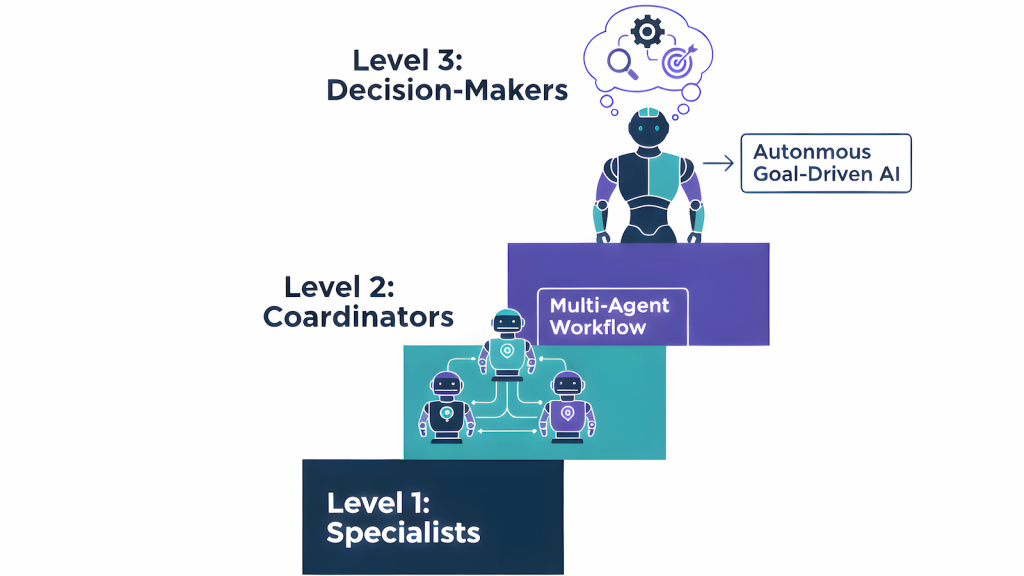
The 3-Level Classification System
Not all AI agents are created equal, and understanding the different levels helps you figure out which one you actually need for your work. I’m going to break this down into three simple categories that actually make sense, not the overly technical frameworks you’ll find in white papers written by people who’ve never used these tools for real work.
Level 1: Single-Task Agents (The Specialists)
These are AI agents that do one specific job really well. They’re not trying to be everything to everyone, they’re focused on a particular repetitive task that you do frequently. A single-task agent takes a clear instruction, uses one or maybe two tools to complete it, and delivers a result.
Real AI tools at this level:
- ChatGPT Custom GPTs: Create a specific GPT that only handles email responses, data analysis, or code reviews
- Claude Projects: Set up a project with a specific role like “customer service responder” or “meeting note summarizer”
- GitHub Copilot: Focuses specifically on code completion and debugging within your IDE
- Zapier single-action automations: One trigger, one action, done
Common examples:
- Email responders that read incoming messages and draft appropriate replies in your tone
- Data analyzers that pull specific numbers from your database and create visualizations
- Code debuggers that scan your repository, identify specific errors, and generate fixes
These agents are perfect for daily repetitive tasks that eat up your time but don’t require complex decision-making. If you find yourself doing the same type of task over and over, asking yourself “why am I still doing this manually,” that’s probably a job for a single-task agent. The real-world analogy here is a barista who makes fantastic coffee but isn’t running the entire café. They’re specialists, not generalists, and that’s exactly what makes them valuable for specific, well-defined problems.
Level 2: Multi-Step Workflow Agents (The Coordinators)
These agents take things up a notch by chaining together multiple actions to complete more complex tasks. They don’t just do one thing, they break down big requests into logical steps, execute each step in sequence, and adjust their approach based on what they learn along the way.
Real AI tools at this level:
- Perplexity Pro: Searches multiple sources, synthesizes findings, generates citations, creates comprehensive research reports
- Claude with Projects and Artifacts: Handles multi-step content creation from research to final draft with revisions
- Jasper/Copy.ai workflow features: Research topic, generate outline, write sections, optimize for SEO in sequence
- Make (Integromat) or Zapier Central: Visual workflow builders that chain multiple apps and AI decisions together
- ChatGPT with Advanced Data Analysis: Upload data, analyze patterns, create visualizations, generate insights all in one flow
Real-world workflow examples:
- Research Agent: Searches the web → Summarizes key findings → Identifies gaps → Cross-references sources → Creates formatted report with citations
- Content Agent: Researches topic → Generates outline based on search intent → Writes first draft → Optimizes for SEO and readability
- Customer Service Agent: Reads support ticket → Checks knowledge base and past interactions → Drafts personalized solution → Updates CRM with notes
When you’re looking at tasks that have multiple sequential steps where each step depends on the outcome of the previous one, that’s when multi-step workflow agents shine. The analogy here is a project manager who doesn’t just do one task but coordinates different parts of a project to make sure everything gets done in the right order. This is where AI automation starts feeling less like a helpful tool and more like an actual team member.
Level 3: Autonomous Agents (The Decision-Makers)
This is where things get interesting and also where the hype sometimes outpaces reality. Autonomous agents operate independently with minimal oversight, making judgment calls and adapting their strategies based on results. They don’t wait for you to tell them what to do next, they set their own subgoals, plan their approach, execute the plan, learn from the results, and adapt their strategy for the next cycle.
Real AI tools at this level:
- Salesforce Einstein: Continuously monitors your sales pipeline, identifies at-risk deals, suggests next actions, updates forecasts
- HubSpot AI: Tracks marketing performance across channels, automatically adjusts campaign parameters, alerts to anomalies
- Relevance AI: Enterprise tool that builds custom autonomous agents for ongoing business processes
- AutoGPT and similar frameworks: Experimental agents that break down goals into tasks and execute them independently (still emerging, often unreliable)
- Microsoft Copilot for Sales: Monitors customer interactions, identifies opportunities, drafts follow-ups, manages pipeline
Examples of autonomous agents:
- Business Intelligence Agent: Monitors your key metrics continuously, identifies anomalies or trends you should know about, proactively alerts you when something needs attention
- Content Strategist Agent: Analyzes your content performance over time, identifies what’s working and what isn’t, suggests strategic pivots before you realize there’s a problem
- Personal Assistant Agent: Manages your entire calendar, prioritizes tasks based on importance and deadlines, proactively schedules meetings when it detects coordination needs
These are perfect for ongoing processes that need constant attention but don’t necessarily need constant human decision-making. The analogy is a COO who runs day-to-day operations while you focus on high-level strategy.
Reality check: This level is still emerging and mostly exists in enterprise-grade or specialized tools. The technology is advancing rapidly, but truly autonomous agents that can handle complex business processes without any human oversight are still more promise than reality for most use cases. The tools exist, but they require significant setup, monitoring, and refinement to work reliably.
Quick Comparison: What Each Level Actually Does
To put this in perspective with concrete examples:
Single-Task Agent: “Send this report to John with the updated formatting”
- Tool: ChatGPT Custom GPT or Claude Project
- Time to set up: 10-30 minutes
- Human involvement: Review before sending
Multi-Step Agent: “Research our top three competitors, analyze their content strategy, and create a comparison report with recommendations”
- Tool: Perplexity Pro, Claude with thinking, or Zapier Central
- Time to set up: 1-3 hours
- Human involvement: Review findings, add strategic insights
Autonomous Agent: “Monitor our market position across these five metrics, alert me when any competitor makes a significant move, and suggest proactive responses”
- Tool: Salesforce Einstein, HubSpot AI, or custom Relevance AI setup
- Time to set up: Days to weeks
- Human involvement: Weekly reviews, approve major decisions
Each level has its place, and the key is matching the right level of agency to the actual complexity of your task. You don’t need an autonomous agent to draft emails, and you can’t use a single-task agent to manage an entire workflow.
What Problems Does Each Type Solve?
Understanding what each level solves helps you pick the right tool for your actual needs.
Single-Task Agents solve:
- Repetitive daily tasks (email responses, basic data pulls, formatting)
- Tasks with clear inputs and outputs
- Problems where you need consistency but not complexity
Multi-Step Agents solve:
- Workflows that span multiple tools or require several sequential actions
- Research and synthesis tasks that would take hours manually
- Content creation from ideation through optimization
- Tasks where context from one step informs the next step
Autonomous Agents solve:
- Ongoing monitoring and alerting needs
- Processes that need 24/7 attention you can’t provide
- Pattern recognition across large datasets over time
- Proactive optimization based on changing conditions
The biggest mistake people make is trying to use a Level 1 agent for a Level 2 problem, or expecting Level 3 autonomy from tools that are really Level 2. Match your tool choice to your actual problem complexity, not to what sounds most impressive.
What You Actually Need to Know
Here’s what matters: “Agentic” just means AI that does work instead of just talking about work. “Generative” just means AI that creates new things instead of only analyzing existing things. The three levels exist on a spectrum from simple task execution to full autonomy, and most real-world use cases sit at Level 1 or Level 2 right now. Level 3 is emerging but requires significant investment and setup.
You probably already have access to Level 1 and Level 2 tools through platforms you’re already using. ChatGPT, Claude, and similar tools can function as either single-task or multi-step agents depending on how you set them up. The barrier isn’t access to fancy technology, it’s understanding which level you actually need for each specific problem you’re trying to solve.
Start by identifying one repetitive task that annoys you. Is it a single action or multiple steps? Does it need ongoing monitoring or just execution when you request it? Answer those questions, pick the appropriate level, choose a tool you already have access to, and start there. You’ll learn more from actually using these tools than from reading about them, and you’ll quickly figure out which level of agency makes sense for your specific workflows.