
I did not set out to build a product. I set out to answer a question that had been bothering me for months: if dev teams can ship code using an AI pipeline with no human in the loop per commit, why can’t a content operation do the same thing?
The short answer is they can. The longer answer is what this post is about.
What AutoBlog AI Actually Is
AutoBlog AI is a self-hosted Windows application that runs an autonomous writing team across multiple WordPress blogs. You configure it once with your sites, niches, and posting schedule. After that it finds its own topics, writes full articles through a 6-stage multi-model AI pipeline, and publishes them under a dedicated AI author account. Your name stays clean. The machine does the work.
It is not a wrapper around ChatGPT. It is not a prompt template. It is an orchestration layer that coordinates multiple AI models the same way a senior engineer coordinates a dev team, each model has a specific role, hands off to the next, and the whole thing runs on a schedule without anyone touching it.
I built it in one conversation with Claude. I had never written Python before. That part is a separate post.
The Pipeline
Every article goes through six stages before it touches WordPress.
The Strategist uses Groq Llama 3.3 to find a topic the site has not covered yet. It identifies the search intent, the angle, the pain points, and the outline structure before anyone writes a word. It also generates the secondary keywords that end up in the meta layer.
The Writer uses Gemini 2.5 Pro to produce the full draft. It has strict rules: minimum 1,200 words, every paragraph at least five sentences, no unnecessary dashes, natural educational tone, and internal links pulled from the site’s own sitemap. Not suggestions. Rules enforced in the prompt.
The Editor uses Groq Mixtral to challenge the draft. Its job is to cut fluff, strengthen weak arguments, and ensure the angle holds from the first paragraph to the last. It does not rewrite everything. It finds the parts that would not survive a sharp editor and fixes them.
The Curator is the quality gate. It checks the edited draft against the writing rules before metadata ever gets generated. If paragraphs are too short, if dashes crept back in, if the search intent got lost somewhere in the editing pass, the curator fixes it or the pipeline logs an error instead of publishing garbage.
The Metadata stage uses Gemini 2.5 Pro again to generate the full SEO package: focus keyphrase, SEO title, slug, meta description, 10 to 15 semantic keywords, excerpt, categories, tags, image prompt, and alt text. This only fires after the curator clears the draft. Not before.
The Proofread stage does a final grammar and flow pass. Then the article either goes to a review queue for human approval or publishes directly, depending on how you have the toggle set.
Six stages. Three different models. Zero human input per article once the pipeline is running.
The Stack
The entire thing runs free on the default configuration.
Groq handles the Strategist, Editor, and Proofread stages. Llama 3.3 70B and Mixtral 8x7B are both available on Groq’s free tier with generous daily limits. Gemini 2.5 Pro and Gemini 2.0 Flash handle the writing and metadata stages. Google’s free tier on AI Studio covers more articles per day than any normal publishing operation needs.
Every pipeline stage has a model selector dropdown in the dashboard. You can swap any stage to Mistral, OpenRouter’s free models, a locally running Ollama instance, or Claude if you want to pay for a quality ceiling. No code changes. Just a dropdown.
The WordPress publisher uses the REST API with application passwords. It populates the standard post fields plus the meta_keywords custom field directly, so the schema layer and your keyword meta tags get populated automatically on every post.
Amazon affiliate links are built into the monetization article type. You enter your Associate tag per site. The pipeline generates search-based links and inserts them naturally into monetization articles. Mode 2, which uses exact ASINs via the Product Advertising API, activates when you add your API credentials after qualifying.
The Article Types
AutoBlog AI does not just write one kind of article. Each niche gets an article type mix that the scheduler rotates through automatically.
Informational articles are structured to rank. Editorial articles take a strong first-person position on something. Viral articles are built around emotional hooks and list formats. Shock articles open with a bold claim and earn it. Monetization articles are built around buyer intent with affiliate links embedded. News-style articles use an inverted pyramid structure for trending topics.
You set the mix per niche. A health blog might run 50 percent informational, 25 percent viral, 25 percent monetization. A productivity blog might run heavier on editorial and shock. The scheduler handles the rotation. You set it once and walk away.
The Experiment
I am running this across four sites for two weeks starting now.
The sites are momentumpath.net, remoteworkhaven.net, healthyforge.com, and hobbyengineered.com. Each has its own niche configuration, article type mix, and AI author account. Alfred handles health and hobby content. Edwin handles productivity and remote work.
The posting frequency is one article per day per site. That is 56 posts across four sites over two weeks. Enough to generate real data without triggering the kind of content velocity that Google’s helpful content systems are specifically designed to catch.
At the end of two weeks I will publish the full results: article quality assessment, Google Search Console indexing data, Amazon affiliate click data, cost per article in real numbers, and which model combinations produced the best output at which pipeline stages.
That data does not exist anywhere else right now because nobody is running this at this scale and documenting it honestly.
Who This Is For
If you run multiple affiliate blogs and you are currently doing all the writing yourself or paying for content, this solves a real operational problem. The writing team runs on free API credits. The only cost is your time to configure it once.
If you run a content agency and you are looking at this thinking about client applications, the architecture supports that. Multi-site, multi-niche, per-site author identities, review queue before anything goes live.
If you are a developer and you want to fork this and build on top of it, the repo is linked below. The code is not perfect. It was written by someone who learned Python through this project. Pull requests are welcome.
If you want to acquire this or license it for a product, I am open to conversations. The architecture is solid, the core problem it solves is real, and two weeks from now there will be actual traction data to attach to that conversation.
What It Is Not
It is not a replacement for human editorial judgment at the strategic level. The pipeline executes the strategy you configure. If your niche description is vague, the topics will be generic. Garbage in, garbage out still applies.
It is not a guaranteed traffic machine. Publishing more articles does not automatically generate more traffic. The experiment will tell us whether the quality holds up well enough to rank. That answer does not exist yet.
It is not a tool for churning thin content at scale and hoping nobody notices. The curation stage exists specifically to prevent that. The writing rules exist specifically to prevent that. If you want to publish slop fast, there are cheaper ways to do it.
The Repo and the Dashboard
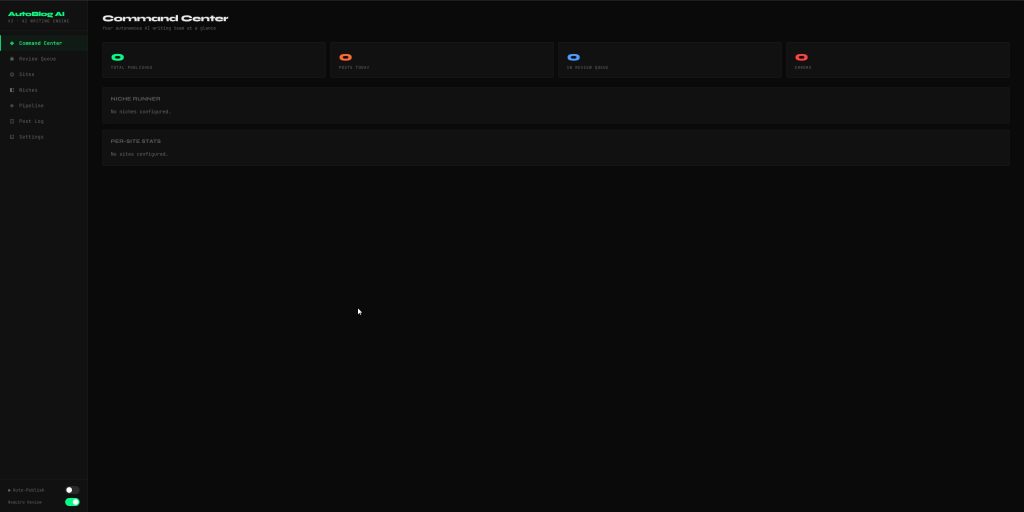
The current version runs locally on Windows. You point a browser at localhost:5000 and get a full dashboard: command center with live pipeline status, review queue with inline editor, site manager, niche manager, pipeline model selector per stage, post log with filters, and settings for all six provider integrations.
The next version moves to a hosted deployment so the scheduler runs without your PC being on. After that, user accounts and a proper SaaS wrapper if the experiment data justifies it.
The code is in the repo here AutoBlog AI. The setup guide walks through every step from installing Python to generating WordPress application passwords to getting your free Groq and Gemini API keys. The whole thing takes about 20 minutes to configure from scratch.
This is Experiment 001 on EngineeredAI.net. Follow the experiment. The results post drops in two weeks.
If you are interested in licensing, acquiring, or building on AutoBlog AI — the contact link is in the header.
