A dev showed me how to stop fighting with AI coding tools. Here’s the system.
The Problem
You’re using ChatGPT Codex or Claude Code. You describe what you want. You get code. It’s not quite right. You re-prompt. The new code breaks the first version. You re-prompt again.
This cycle wastes time.
A dev I know had the same problem. He solved it by breaking his work into separate phases instead of asking AI to do everything at once.
His reasoning: “The smaller the scope, the more refined and isolated it is. If there are errors, you know exactly where they happened.”
That’s it. Small scope = easier debugging.
Here’s why it works:
- Error in Phase 3? Your plan from Phase 1 is still good.
- Each phase does one thing. Easier to fix when it breaks.
- Already have a plan? Skip straight to coding.
- Need to adjust? Change one phase without starting over.
- Bug in one phase doesn’t wreck everything else.
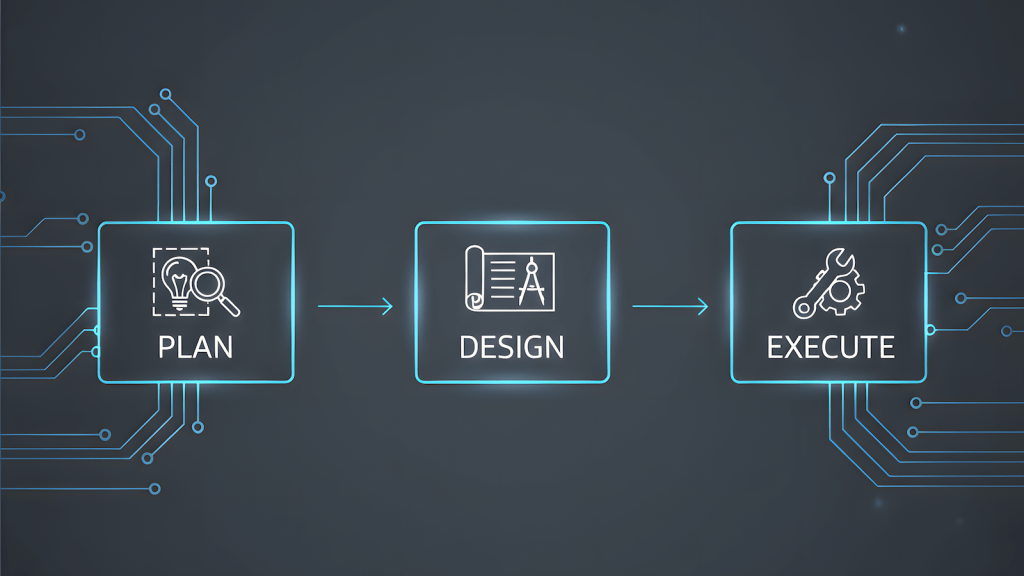
The 3-Phase Workflow
This is what he uses with ChatGPT Codex. Works the same in Claude Code.
Phase 1: Plan to Save
Make a plan. That’s it.
Ask AI to create a project plan:
- What you need to build
- File structure
- Dependencies
- Requirements
Save it as project-plan.md.
Why separate? You can review and fix your plan before writing any code. If your approach is wrong, you catch it here – not after 500 lines of code.
Phase 2: Plan to Code
Now take that plan and ask AI for technical recommendations:
- Which framework to use
- Database choice
- Libraries
- Project structure
- What could go wrong
Save the recommendations.
Why separate? Your project plan might be solid, but maybe there’s a better library. Maybe your initial setup won’t scale. Catch these issues before you code.
Phase 3: Plan to Execute
Now you actually write the code.
AI generates code based on Phase 1 and Phase 2. Save it to your project directory.
Why separate? If the code has bugs, you don’t question your entire plan. You just fix the code. Your thinking and design stay intact.
Why This Beats One-Shot Prompting
One-shot approach:
“Build me a REST API for a blog with users, posts, and comments using Node.js”
You get… something. Maybe it works. Maybe it uses libraries you don’t want. Maybe the structure is wrong. Now what? Start over? Try to patch it?
3-phase approach:
Phase 1:
"Help me plan a REST API project for a blog. I need users, posts, and comments.
Create a plan with:
- Features needed
- Data models
- API endpoints
- Auth approach
- File structure
Save this as a project plan."
You review the plan. You forgot about image uploads. You add it. You fix the data models.
Phase 2:
"Based on the project plan, recommend:
- Node.js framework (Express, Fastify, Koa)
- Database and ORM
- Auth library
- Project structure
- Testing approach
Explain trade-offs."
You get recommendations as well as the pros and cons. With that in mind, you can now start coding.
Phase 3:
"Implement the REST API following the plan and recommendations.
Start with user authentication.
Save to /src directory."
Now you’re actually coding. If something breaks, you know it’s a bug in the code, not a problem with your plan or architecture.
ChatGPT Codex: Skill Builder
ChatGPT Codex has a skill builder. Save these workflows as reusable templates.
Once built:
- “Use the plan-to-save skill for a Python web scraper”
- “Run plan-to-code on this project plan”
- “Execute the implementation skill”
Codex follows your instructions every time.
Claude Code: Same Idea, Different Setup
Claude Code works the same way. It just uses a different format.
Create skills by:
- Making a directory in
~/.claude/skills/ - Adding a
SKILL.mdfile with YAML frontmatter - Writing your workflow in markdown
Example for “plan-to-save”:
~/.claude/skills/plan-to-save/SKILL.mdyaml
---
name: plan-to-save
description: Create project planning documents with requirements, architecture, and file structure
---

# Plan to Save Workflow

When invoked, create a detailed project plan including:
- Project requirements and goals
- Technical constraints
- Proposed file structure
- Dependencies needed
- Implementation phases

Save the output as `project-plan.md` in the current directory.
Same 3-phase workflow. Just adapt the format to Claude Code’s structure. The principle stays the same: modular, reusable, easier to debug.
This Works for More Than Code
This isn’t just for coding tools like Codex and Claude Code.
The same idea works for AI chatbots (ChatGPT, Claude) when creating content or handling complex tasks.
Example content workflow:
- Brainstorm – Topics and strategy
- Brief – Article framework with references
- Draft – Write the content
- Optimize – SEO and final touches
Same idea – break it down, isolate the parts, make errors easier to fix.
(I’ll publish a detailed breakdown of this content workflow in another article. That article will be created using the exact workflow it describes. Meta, I know.)
Why This Matters
You’re not building ChatGPT Codex skills or Claude Code skills. You’re building YOUR workflow.
AI models change. New tools come out. But if you’ve documented your process as modular workflows, you can:
- Port your skills to any AI tool
- Train people faster
- Keep projects consistent
- Fix things when they break
You’re not relying on AI memory (which sucks). You’re not locked into one tool. You’re building process documentation that works with any AI.
Getting Started
- Pick a task you do often with AI
- Break it into 3-5 phases (planning, design, execution, etc.)
- Define what goes in and what comes out of each phase
- Test it on a real project
- Save it as a reusable skill
The goal isn’t to make AI do everything. It’s to make AI do specific things well, consistently, in a way you can debug when it breaks.
Bottom Line
Stop treating AI like it knows what you want. Treat it like a tool that needs instructions.
This isn’t about better code or better content. It’s about building processes that work no matter which AI tool you’re using this month.
The dev who figured this out? He’s not just writing better code. He’s thinking better about how humans and AI actually work together.